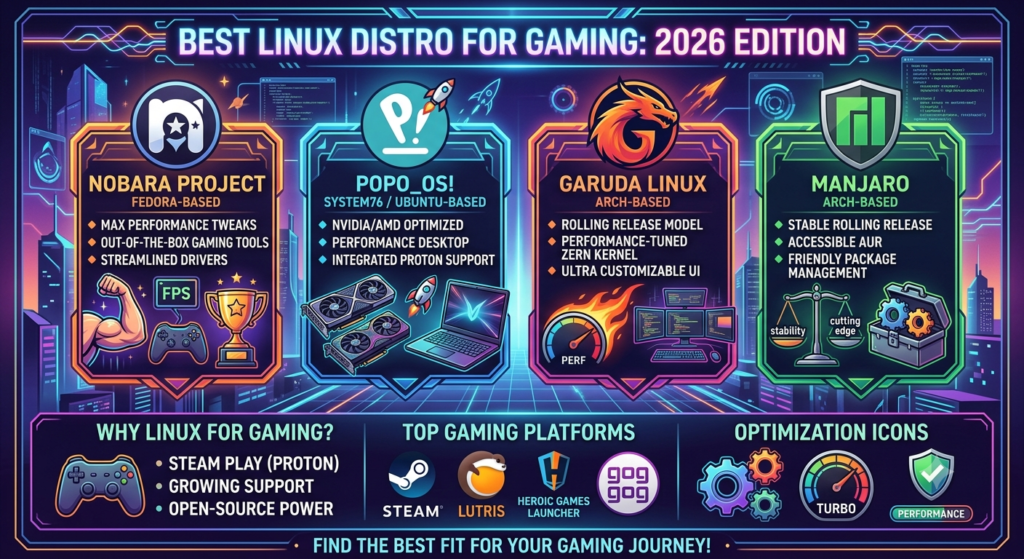

Linux gaming has experienced major growth over the last few years. Once considered a platform mainly for developers and advanced users, Linux has become a realistic alternative for many PC gamers who want more control, customization, and flexibility.
In 2026, choosing the Best Linux distro for gaming is no longer just about finding a lightweight operating system. Modern Linux distributions now provide better hardware support, improved graphics drivers, easier software installation, and stronger compatibility with Windows games.
One of the biggest reasons behind Linux gaming growth is the improvement of technologies like Steam Play and Proton. Developed by Valve and the Linux gaming community, these tools allow many Windows games to run on Linux systems without requiring a traditional Windows installation.
Why Linux Is Becoming Popular for Gaming in 2026
Linux gaming has improved because several important technologies have developed together. Better compatibility tools, stronger driver support, and active gaming communities have helped Linux become a more practical gaming platform.
Better Game Compatibility With Proton and Steam Play
Proton, developed by Valve, has significantly improved Linux gaming by allowing many Windows games to run on Linux through Steam Play. It uses technologies based on Wine and other open-source tools to improve compatibility.
Before Proton, running Windows games on Linux often required complex solutions. Today, gamers can enable Steam Play and access a much larger library of supported games.
Improved GPU Driver Support and Hardware Performance
Best linux distro for gaming performance has improved significantly due to better hardware support and updated graphics technologies. AMD users benefit from strong open-source driver support through the Linux kernel and Mesa, while NVIDIA users can use official drivers for better compatibility.
Modern Linux distributions provide easier driver management and improved graphics performance. However, gaming results still depend on hardware specifications, drivers, system configuration, and game optimization.
Growing Support From the Linux Gaming Community
The Linux gaming community has become an important part of the ecosystem. Users, developers, and open-source contributors continue creating guides, tools, and solutions that make gaming easier.
Communities around Ubuntu, Fedora, Arch Linux, and gaming-focused distributions provide valuable troubleshooting information.
Platforms such as ProtonDB allow gamers to check community reports about game compatibility before installing a title.
What to Look for in a Linux Gaming Distro
Choosing the Best Linux distro for gaming requires understanding what features matter most for your gaming needs.
Gaming Performance and System Optimization
Performance is a major factor when selecting a gaming distribution. A good gaming distro should manage system resources efficiently and provide access to updated drivers and gaming software.
Some distributions focus on being lightweight, reducing unnecessary background processes. Others include gaming tools and optimizations that make setup easier.
Game Compatibility and Software Support
A good Best linux distro for gaming distribution should support important gaming platforms and applications.
Essential gaming support includes:
- Steam installation
- Proton compatibility
- Graphics driver support
- Controller support
- Game management tools
- Performance monitoring applications
Hardware and Graphics Card Support
Hardware compatibility is critical for gaming.
Before choosing a Linux distro, users should consider:
- Graphics card support
- Processor compatibility
- Gaming accessories
- Wireless hardware
- Driver availability
Ease of Use for New Linux Users
Linux is more beginner-friendly today than ever before, but different distributions still have different difficulty levels.
New users often prefer distros with:
- Easy installation
- Simple software management
- Clear documentation
- Large communities
- User-friendly interfaces
10 Best Linux Distro for Gaming in 2026

1. Bazzite – Best Overall Linux Gaming Distro
Bazzite is a gaming-focused Linux distribution designed to provide a smooth and reliable gaming experience. It uses Fedora Atomic technology, which focuses on stability and easier system maintenance.
Bazzite is popular because it reduces the amount of manual configuration normally required after installing Linux. It provides strong Steam integration, Proton support, and gaming-focused features.
Best for: Gamers who want a ready-to-use Linux gaming system.
2. Nobara Linux – Best Gaming-Optimized Fedora-Based Distro
Nobara Linux is based on Fedora and focuses on improving the experience for gamers and content creators.
It includes additional configurations and software choices that reduce the setup process required after installing a standard Fedora system.
Nobara is a strong choice for users who like Fedora’s modern technology but want a more gaming-ready environment.
Best for: Gamers who want Fedora with additional gaming improvements.
3. Pop!_OS – Best Linux Distro for NVIDIA Gaming
Pop!_OS, developed by System76, is one of the most beginner-friendly Linux distributions available. It is especially popular among gamers who use NVIDIA graphics cards because it provides a simpler way to install and manage NVIDIA drivers.
Graphics driver setup has traditionally been one of the more challenging parts of best linux distro for gaming. Pop!_OS helps reduce this difficulty by offering an NVIDIA-specific installation option, making the setup process easier for new users.
The distribution also provides a clean desktop experience, good hardware support, and useful productivity features. While Pop!_OS is not designed only for gaming, it provides a strong foundation for gaming, programming, and everyday computer use.
Best for: Beginners and gamers using NVIDIA graphics cards.
4. Linux Mint – Best Beginner-Friendly Gaming Distro
Linux Mint is one of the most popular Linux distributions for new users because of its simplicity, stability, and familiar desktop experience.
Although Linux Mint is not specifically designed as a gaming operating system, it provides a reliable environment where users can install Steam, Proton, gaming tools, and other applications easily.
Best for: Beginners who want a stable and easy Linux gaming experience.
5. Ubuntu – Best Linux Gaming Distro for Compatibility
Ubuntu remains one of the most widely used Linux distributions worldwide. Its popularity has made it one of the easiest platforms for finding software support, guides, and troubleshooting solutions.
Many developers test Linux software on Ubuntu because of its large user base. This means gamers often have access to more tutorials and solutions compared with smaller distributions.
Best for: Gamers who want maximum software compatibility and support.
6. SteamOS – Best for Steam-Based Gaming
SteamOS is Valve’s Linux-based operating system created specifically around gaming. It became widely known through the Steam Deck, which introduced many users to Linux gaming.
The main purpose of SteamOS is to provide a console-like gaming experience. Instead of focusing on traditional desktop tasks, it prioritizes quick access to games and Steam features.
Best for: Steam users and dedicated gaming devices.
7. Fedora KDE Spin – Best for Modern Gaming Hardware
Fedora KDE Spin provides a modern Linux desktop environment with access to newer technologies.
Fedora is known for adopting recent Linux improvements, making it attractive for users who want updated software and strong hardware support.
The KDE Plasma desktop environment provides extensive customization options while maintaining a smooth experience.
Best for: Experienced gamers with newer hardware.
8. Garuda Linux – Best for Performance and Customization
Garuda Linux is an Arch-based distribution designed for users who enjoy customization and performance tuning. It provides access to newer software packages and allows advanced users to adjust their system according to their preferences.
Garuda includes several tools that make system management easier while keeping the flexibility associated with Arch Linux.
Best for: Advanced users who want customization and control.
9. Arch Linux – Best for Advanced Linux Gamers
Arch Linux is famous for giving users complete control over their operating system.
Unlike beginner-focused distributions, Arch allows users to build their system from the ground up. This approach gives experienced users the ability to install only the software they need and customize every part of the environment.
Arch provides access to the latest software packages and excellent documentation through the Arch Wiki.
Best for: Experienced Linux gamers who want maximum control.
10. EndeavourOS – Best Lightweight Gaming Distro
EndeavourOS provides a simpler way to experience Arch Linux while keeping much of its flexibility.
It offers an easier installation process compared with traditional Arch installation while allowing users to customize their system.
Because it is lightweight, EndeavourOS can be a good choice for gamers who want more control over system resources.
Best for: Users who want an Arch-based gaming system with easier setup.
Read more: What Is Honzava5 Online Games? Complete Guide, Features & Review
Comparison of the Best Linux Gaming Distros in 2026
Choosing the Best Linux distro for gaming depends on the type of gamer you are. Some users need simplicity, while others want maximum customization.
| Linux Distro | Best For | Experience Level |
| Bazzite | Gaming-focused setup | Beginner to Intermediate |
| Nobara Linux | Fedora-based gaming | Intermediate |
| Pop!_OS | NVIDIA users | Beginner |
| Linux Mint | Easy Linux experience | Beginner |
| Ubuntu | Compatibility and support | Beginner |
| SteamOS | Steam gaming | Beginner |
| Fedora KDE Spin | Modern hardware | Intermediate |
| Garuda Linux | Customization | Advanced |
| Arch Linux | Complete control | Advanced |
| EndeavourOS | Lightweight Arch experience | Intermediate |
Performance Comparison
Gaming performance depends on hardware, drivers, game optimization, and system configuration.
Gaming-focused distributions may provide a smoother setup process, but they do not automatically make every game faster.
A properly configured Linux system with updated drivers can provide excellent gaming performance.
Compatibility Comparison
Compatibility has improved significantly because of Proton and Steam Play. Many games work well on Linux, but users should check compatibility for specific titles, especially competitive multiplayer games with anti-cheat systems.
Features and User Experience Comparison
Different distributions focus on different priorities:
- Bazzite focuses on gaming convenience.
- Pop!_OS focuses on usability and NVIDIA support.
- Ubuntu focuses on compatibility.
- Arch focuses on customization.
- SteamOS focuses on console-style gaming.
Best Linux Gaming Distros for Different Types of Gamers
The Best Linux distro for gaming depends on the type of user, hardware setup, and gaming expectations. A beginner who wants a simple experience may choose a different distribution than an advanced user who wants complete control over their system.
Best Distro for Beginners
For users who are completely new to Linux, simplicity and community support are important factors.
Pop!_OS, Linux Mint, and Ubuntu are excellent choices because they provide easy installation, user-friendly interfaces, and extensive documentation.
These distributions make it easier to install Steam, manage software, update drivers, and solve common problems.
Best Distro for High-End Gaming PCs
Gamers with powerful hardware often want a system that supports modern components and provides access to newer technologies.
Bazzite, Nobara Linux, Fedora KDE Spin, and Arch-based distributions can be good choices for high-end gaming computers.
However, having powerful hardware does not automatically guarantee better gaming performance. The quality of drivers, game compatibility, and system configuration often have a greater impact.
Best Distro for NVIDIA and AMD GPUs
Graphics card support is one of the most important factors when choosing a Linux gaming distribution.
For NVIDIA users, distributions such as Pop!_OS are popular because they simplify NVIDIA driver installation.
For AMD users, many modern Linux distributions provide strong support through open-source drivers included in the Linux graphics ecosystem.
Best Lightweight Gaming Distro
Gamers using older computers or lower-end hardware may prefer lightweight distributions.
A lightweight Linux system uses fewer background resources, allowing more system power to be available for games.
EndeavourOS, minimal Arch installations, and lightweight desktop environments can be good options for users who want maximum resource efficiency.
How to Optimize Linux for Better Gaming Performance
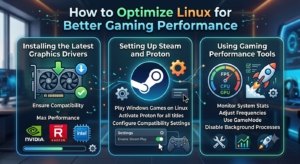
Installing the Best Linux distro for gaming is only the first step. Proper optimization can improve stability, compatibility, and overall gaming performance.
Installing the Latest Graphics Drivers
Graphics drivers play a major role in gaming performance. AMD and Intel graphics usually benefit from open-source drivers that are integrated into many Linux distributions.
NVIDIA users often need to install proprietary drivers to achieve the best performance and compatibility. Keeping drivers updated helps improve support for newer games and hardware.
Setting Up Steam and Proton
Steam is one of the most important gaming platforms available on Linux. After installing Steam, users can enable Steam Play and Proton to run supported Windows games.
Different Proton versions may provide different results depending on the game. Some users use community compatibility databases to check whether a game works well before installation.
Using Gaming Performance Tools
Linux provides several tools that can help users monitor and improve gaming performance.
Useful tools include:
- System monitoring applications
- Performance optimization utilities
- Controller management tools
- Game launch configuration tools
Challenges of Gaming on Linux
Although Linux gaming has improved significantly, users should understand some limitations before switching completely.
Game Compatibility Limitations
Linux now supports many popular Best linux distro for gaming, but compatibility is not perfect. Some games may require additional configuration, while others may not work because of technical restrictions. Gamers should check compatibility before moving their entire gaming library to Linux.
Anti-Cheat Software Issues
Anti-cheat systems remain one of the biggest challenges for Linux gaming. Some competitive multiplayer games use security software that does not fully support Linux environments.
While compatibility has improved, support depends on individual game developers and the technology they choose. Players who mainly play competitive online games should research compatibility carefully.
Hardware and Driver Challenges
Linux hardware support has improved greatly, but some hardware may still require extra configuration.
Potential challenges include:
- Certain gaming peripherals
- Specialized accessories
- Wireless devices
- Older hardware
Linux Gaming vs Windows Gaming in 2026
The comparison between Linux and Windows gaming has become closer as Linux technology improves.
Gaming performance depends on the specific game, hardware, drivers, and optimization.
Some games may perform similarly on both operating systems, while others may perform differently because of software optimization.
A properly configured Linux system can provide strong gaming performance for supported titles.
Game Library Support
Windows still has the largest native PC gaming library. Linux has expanded its gaming support through Proton and Steam Play, allowing many Windows games to run successfully. However, some games remain unavailable because of compatibility issues.
User Experience Comparison
Windows provides a familiar experience with broad software and hardware support. Linux provides more customization, transparency, and control over the operating system. Gamers who want maximum compatibility may prefer Windows, while users who value flexibility and customization may prefer Linux.
Final Thoughts
Linux gaming has developed significantly and is now a realistic option for many PC gamers. Improvements in Proton, Steam Play, graphics drivers, and gaming-focused distributions have made the experience much better than it was in the past. The Best Linux distro for gaming depends on what each user needs.
Beginners may prefer Pop!_OS, Linux Mint, or Ubuntu because they provide easier setup and strong support. Gamers who want a dedicated gaming environment may choose Bazzite or Nobara Linux. Advanced users who enjoy customization may prefer Arch Linux, Garuda Linux, or EndeavourOS.
FAQs About Best Linux Distro for Gaming
Which Linux distro is best for gaming in 2026?
The Best Linux distro for gaming depends on individual needs. Bazzite is suitable for users who want a gaming-focused system, Pop!_OS is useful for NVIDIA users, Ubuntu provides strong compatibility, and Arch-based systems offer customization.
Is Linux good for PC gaming?
Yes. Linux has become a strong gaming platform because of improvements in Proton, Steam Play, graphics drivers, and gaming-focused distributions. However, some games may still have compatibility limitations.
Can Linux run Windows games?
Many Windows games can run on Linux through Proton and other compatibility technologies. Performance and compatibility depend on each individual game.
What is the fastest Linux distro for gaming?
There is no single fastest Linux gaming distribution. Performance depends on hardware, drivers, configuration, and game optimization.
Which Linux distro is easiest for beginners?
Pop!OS, Linux Mint, and Ubuntu are among the easiest choices for beginners because they provide simple setup processes and strong community support.